Using Google Chrome Sync Feature and What Google Knows About You
A nice feature of Google Chrome. It has a sync feature. If you work in multiple computers (e.g. at work, home, laptop), you can use sync so that all your {bookmark, preferences, extensions (add-ons)} will be available without you having to find and install each of them.
As of today, the following items can be synced:
- bookmark
- autofill
- passwords
- preferences
- apps
- extensions
- themes
You can also choose which to not be synced.
Turn On Sync Feature
To turn it on, click on the wrench icon on upper right then menu [Options ▸ Personal Stuff ▸ Sync].
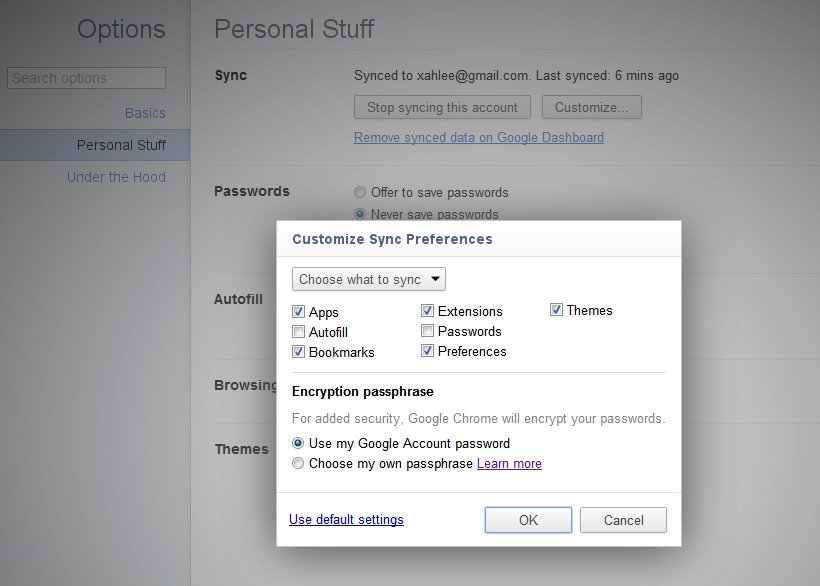
Suppose you turned on sync at work. Then, at home, just turn on sync and your Google Chrome will have the same setup as at work.
For each item you put a checkmark, it means Google will have that info on their server.
View Your Private Data Stored by Google
You can view all the data Google has about you. Go to google.com, login, then upper right click on your name, then “Account Settings”. Or, just click this: https://www.google.com/accounts/ManageAccount.
Then, click “Dashboard, View data stored with this account”. Here's a screenshot:
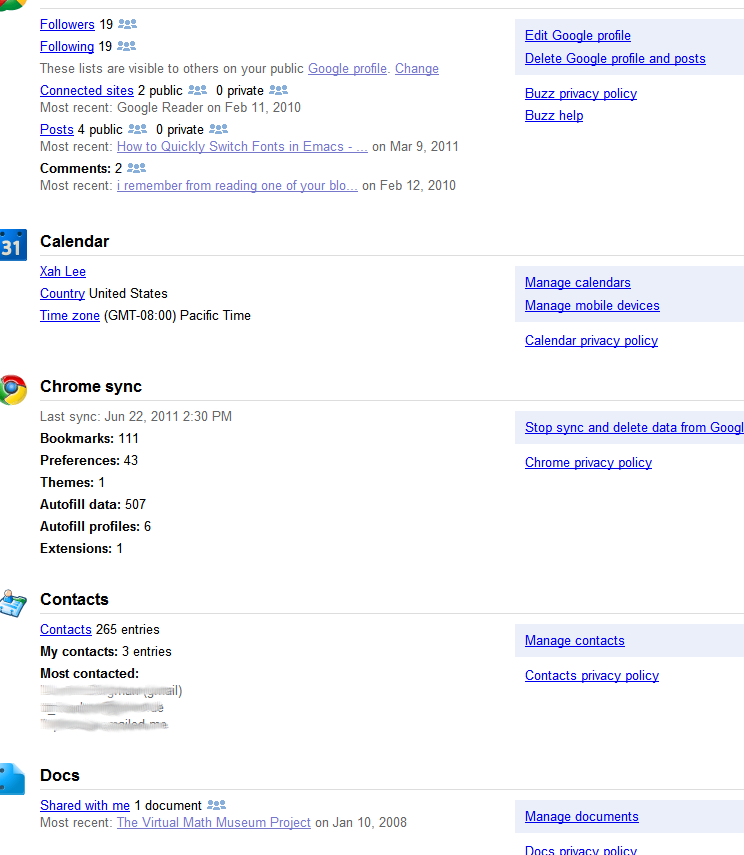
Note: even if you don't have any Google account, Google probably knows a ton about you. If you use Facebook, it's much worse. See: Facebook's Ethics (2010) .
Adjust your Google Ad preferences, or Opt Out
Adjust your Google Ad preferences, or Opt Out: http://www.google.com/ads/preferences/