Firefox browser. How to Add/Change Keyboard Shortcuts (2013)
By Xah Lee. Date: . Last updated: .
This page shows you how to add or change Firefox keyboard shortcuts.
Download this Firefox extension at http://forums.mozillazine.org/viewtopic.php?t=72994 (That page looks lousy and dated, but the tool works.)
Once installed, go to menu [Tools ▸ Keyconfig].
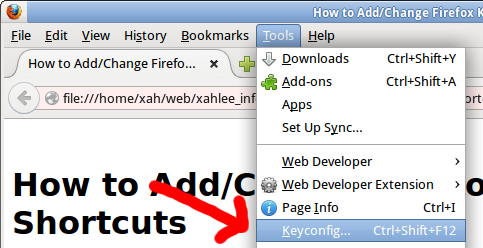 Firefox keyconfig extension menu
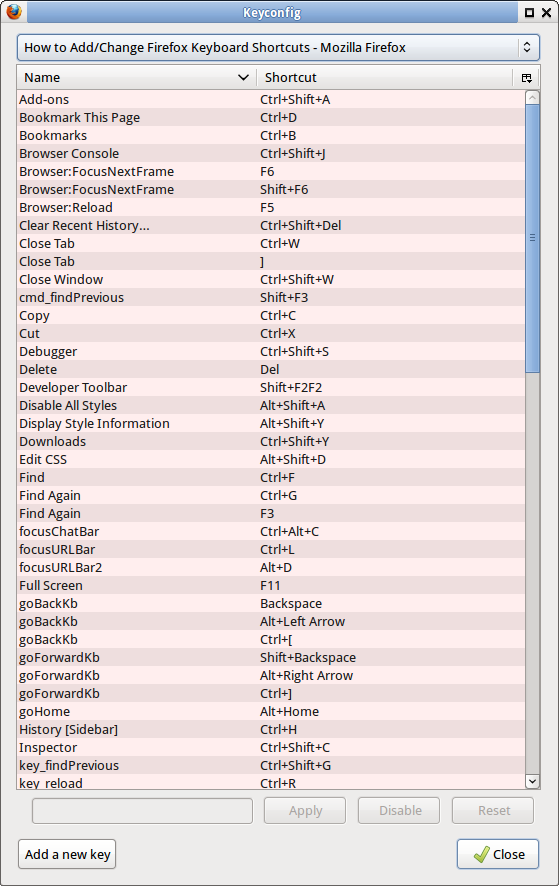 Firefox keyconfig extension panel
Adding Key for Previous/Next Tab
by default, there is no key setup for previous/next tab. You can add it, by clicking on the “Add a New Key” button. Here's the code:
- Next Tab:
gBrowser.mTabContainer.advanceSelectedTab(1,true);
- Previous Tab:
gBrowser.mTabContainer.advanceSelectedTab(-1,true);
Once you added, click on the key box and press the key you want.
Also, be sure to click Apply.
Then, it'll work. No need to restart after changing keys.
Reference http://superuser.com/questions/145280/firefox-can-i-change-the-keyboard-shortcuts-for-tab-switching