Mac: Keyboard Software Guide
Here's a guide for Mac keyboard software for key remap, key shortcut, launch software, and other automations.
I created a Dvorak Keyboard Layout using ResEdit on Mac back in 1992, and been using QuicKeys back then, it was the best automation tool. Also many app launchers and keyboard tools over the decades that came and went. On this page, i only list the latest ones that's still available.
Programable Keyboards
First, get a programable keyboard with onboard memory. This is the best solution. Because you can plug the keyboard in any computer and it'll work with your settings.
Karabiner-Elements
Change Keyboard Shortcut in App
Mac OS X since 10.4 (year 2005) lets you change keyboard shortcut in a specific app.
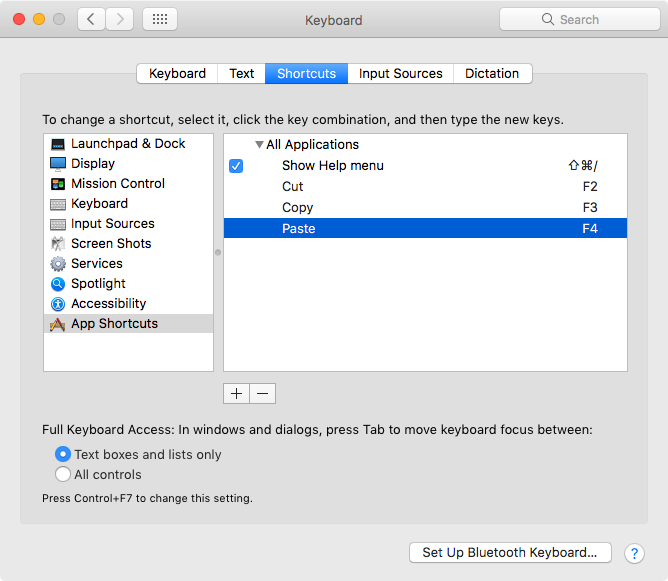
Go to System Preferences, Keyboard and Mouse, Keyboard Shortcuts. Then click the + sign add button.
Note: This mechanism is not very flexible, because:
- Once you create a hotkey, the original key won't work anymore. (e.g. if you set F3 to Copy, then ⌘ command+c won't work.)
- It only lets you create a key for a action that has a menu. (e.g. you cannot define a key to launch a app.)
- Numerical keypad keys cannot be used as trigger. (e.g. you cannot make the number pad keys as personalized extra function keys.)
Suppose you have a gaming mouse, and you've set buttons to do copy and paste, across any computer running macOS. But you've also made F2 as copy on your home Mac, so you can do them easily from keyboard too. Now, your mouse copy button don't work anymore, because ⌘ command+c no longer works.
App Launcher
App launchers are primarily designed to launch apps, open files, run scripts. You set a key to do them, or, a hotkey that pops up a dialog, then type any letter to launch or search.
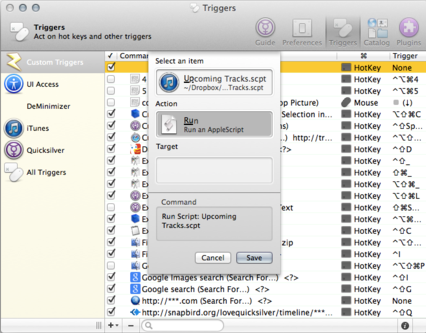
Quicksilver. A app launcher. Assign hotkey to launch/switch/open apps or files. The hotkey can be single key (e.g. F1) or combo-key (e.g. ⌘ command+F1).
Alfred Automation Tool
Hammerspoon Automation Tool
Using lua as scripting language.
Keyboard Maestro
USB Overdrive
USB Overdrive is low-level USB tool. It lets you remap key or mouse buttons at USB level.
Excellent.
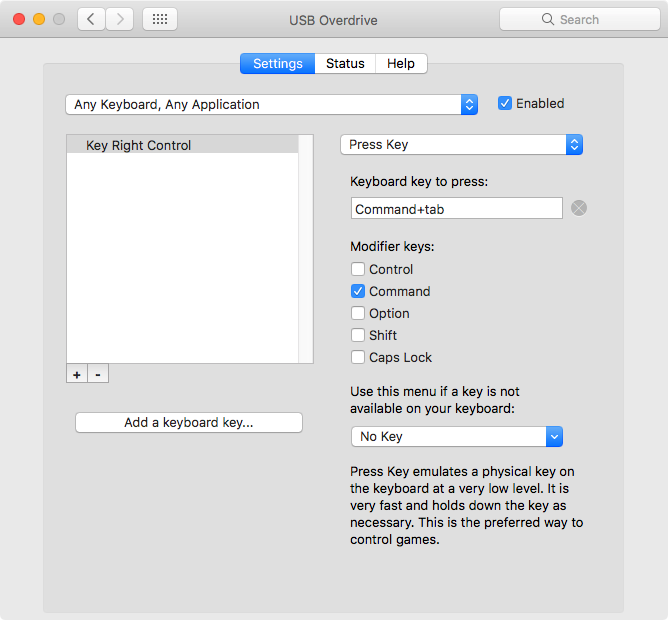
〔USB Overdrive By Alessandro Levi Montalcini. @ http://www.usboverdrive.com/USBOverdrive/News.html〕
〔KeyBindingsEditor By Gerd Knops. @ http://www.cocoabits.com/KeyBindingsEditor/〕
View Keypress and Keycode
Key Codes

〔Key Codes By Peter Maurer. http://manytricks.com/keycodes/〕
ControllerMate
〔ControllerMate at http://www.orderedbytes.com/controllermate/. Commercial. USB interface mapper. Seems to let you remap any USB input device's signals in flexible ways, including mouse.〕
[review of ControllerMate by Jonny, 2017-02-27.]
I've been using ControllerMate for several years now and I have to say that it is really an amazing and extremely powerful piece of software, and very flexible! The developer is also very quick to respond to questions on the forum and to come up with solutions which require coding (custom patches or add ons to download, or updates to download- depending on the situation). There is a bit of a learning curve! And while the interface is logical and straightforward, getting used to the basic underlying logic behind it all takes some time. But I can't even begin to explain all the unique and creative things you can do with it.
But I'll give a could examples... I quite easily was able to switch around and re-program lots keys on my keyboard (KM0Z1-5N6P and was able to physically switch the keys around as well to match), I also did some more complicated reprogramming using the Apps/Menu key almost like a new modifier, mainly to launch apps but also to access the higher Fn-keys (adding 10 to what's printed on the keyboard — only up to F20 though which he says is the MacOS limit).
I also customized my trackball so that if I double-middle-click-hold the ball becomes an any direction scroll “ball”.
Another major product was creating a very unique, customized programming for a Logitech G13. I did use the native software for just a couple of functions- basically for setting up the backlight colors for the various “pages” and configuring the applets. One cool thing I did that I use all the time is to setup the joystick to switch “Spaces” (Mission Control), and to move windows between my multiple monitors, and to move windows between “Spaces” depending on which of the adjacent button(s) I'm holding. It's SUPER easy and convenient! I also use those buttons (pretty much designed to be mouse buttons) as shift-life modifiers to access deeper levels of the closer buttons (in addition to and unique for the 3 ‘main’ pages which are built in). In some cases I set them up to trigger regular hotkeys, sometimes I create custom hotkeys with the keyboard control panel (typically using combos involving keys that aren't even on my keyboard or that are very difficult to type), and sometimes I have them trigger AppleScripts that native commands or use GUI control but only if the app is already running.
Honestly that barely even scratches the surface of all the things I know that ControllerMate can do which is only a fraction of what it can really do!