PowerShell: Meaning of mode column letters in dir output
Meaning of Mode Column Letters in dir Output
Common attributes are displayed in the first column of output of Get-ChildItem
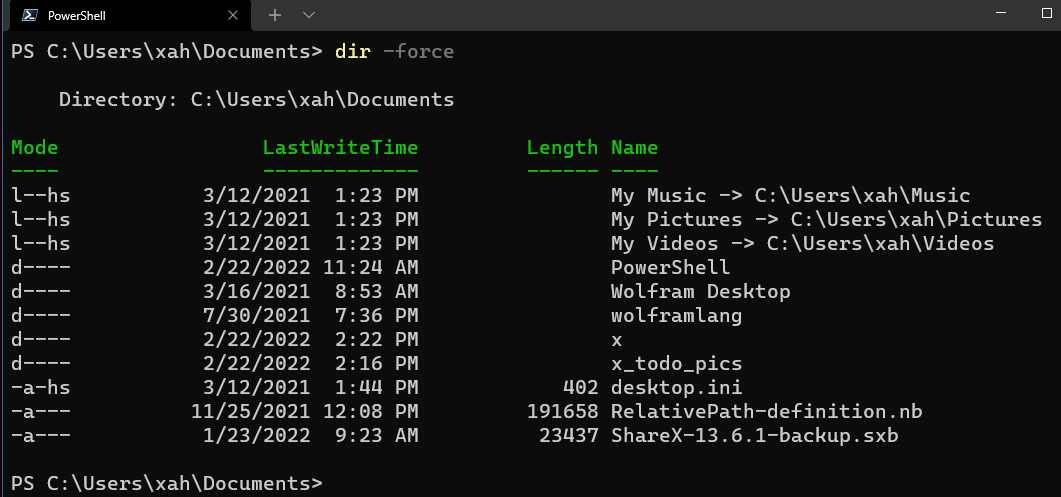
Meaning of the mode letters:
l(link. Link points to another file)d(directory)a(archive) → marked for backup. (file been modified since last backup)r(read-only)h(hidden)s(system)
PowerShell. File Properties, Attributes, Permission
- PowerShell: File Properties
- PowerShell: File Attributes
- PowerShell: Meaning of mode column letters in dir output
- PowerShell: List All Possible File Attribute Values
- PowerShell: Show File Attributes
- PowerShell: Show Hidden Files
- PowerShell: List Files with Specific Attribute
- PowerShell: Set a File's Attributes
- PowerShell: Set File Read Only Attribute
- PowerShell: File Attributes Object Type
- PowerShell: Change File Owner Perm (ACL)