Xah Talk Show 2026-01-03 Ep737 Learning Fsharp. Write a Find Replace Script. Part 2.
Video Summary (Generated by AI, Edited by Human.)
This video, part two of "Learning Fsharp: Write a Find Replace Script," focuses on the practical implementation of an F# script to perform find and replace operations on files within a directory.
Here's a summary of the key points:
Recap of Part 1 (0:21): The speaker briefly mentions the previous episode where they learned F# basics by asking grok AI about reading/writing files, string replacement, and listing directory contents.
Goal: Create a Find/Replace Script (1:07): The main objective is to write a find and replace script in F#, similar to scripts the speaker has in other languages like Go, Python, Perl, and Emacs Lisp.
Setting Up the Environment (2:02): The speaker demonstrates how to set up a test directory using the Emacs Lisp manual files (2:12) and explains the process of copying and backing up directories within Emacs (2:55).
Emacs and Efficiency Setup (3:09): The speaker showcases their Emacs setup, including command calls and keystrokes, and mentions their keyboard (Ultimate Hacking Keyboard UHK80) (6:59) and trackball (Nulea M505) (7:58) for efficiency.
F# Code Structure and Variables (4:21): The speaker starts writing the F# script, defining variables for the input file path and file name extension (HTML files for this example) (11:00). They also discuss F# variable naming conventions (camel case) (11:19).
Listing Files Recursively (14:31): The script is developed to enumerate files recursively within the specified directory and filter by the file extension. The speaker also discusses the difference between forward slashes and backslashes in file paths (15:06).
Reading File Content (35:36): The video explains how to read the content of each file in the list using File.ReadAllText (35:40) and demonstrates printing the content to verify it works (37:05).
Implementing Find and Replace (42:17): The core of the script is built, demonstrating how to use the .Replace method on the file content (43:56) and verifying the replacement by searching for the new string in the output (45:37).
Saving Modified Files (46:00): The speaker shows how to write the modified content back to the files using File.WriteAllText (46:06).
Troubleshooting and Indentation (47:05): The speaker encounters and resolves a syntax error related to F# indentation, highlighting the importance of correct spacing (47:05-56:00). They use AI (grok) to help fix the code (51:57).
Verifying Find and Replace (57:07): The speaker tests the script with different find and replace strings and explains why some searches might not yield results due to directory ignore directives in their Emacs setup (1:00:00).
Future Enhancements (1:03:46): The speaker mentions adding features like file backup options to the script, which is a common practice in their other find and replace scripts.
Why variable name starts with x, and sigils as syntactic type system. (01:06:30)
Opinion on hyper 7 keyboard (01:25:47)
- why variable name start with x, and sigils as syntactic type system.(in perl php ruby PowerShell lisp clojure)
- https://youtu.be/yGsf3p-7qrE?t=3990
- opinion on hyper 7 keyboard
- https://youtu.be/yGsf3p-7qrE?t=5147
- Golang: Find Text in Directory (grep) 📜
- Golang: Regex Find Replace Text in Directory 📜
- Python: Find Replace Text in Directory 📜
- Python: Regex Find Replace Text in Directory 📜
- Perl: Find Replace Text in Directory 📜
- Emacs: Find Replace Text in Directory
- Emacs: Xah Find Replace (xah-find.el) 📦
- Wolfram: Find Replace Text 📜
- Variable Naming. English Words Considered Harmful
- The Sigil War, Syntactic Indicator for Types of Function and Variable (2016)
- Function Parameter names start with phi φ, variable names start with xi ξ (2014)
- Emacs Lisp Coding Style. DOLLAR SIGN $ and AT SIGN @ in Variable Names
- Jargon: Predicate in Programing Languages (2014)
- Syntactic Meaning of Variable (2018)
- Perl: Variable Name Prefix (aka Sigil)
- Ruby: Variable Name Conventions
- PowerShell: Variable
- Clojure: Variable Name Conventions (sigil. macro magic characters.)
- in fsharp, how to write a function that goes thru a list of file path and print the path
- https://x.com/i/grok/share/olsVCfVrWZhl3ragG8JaNLQ8y
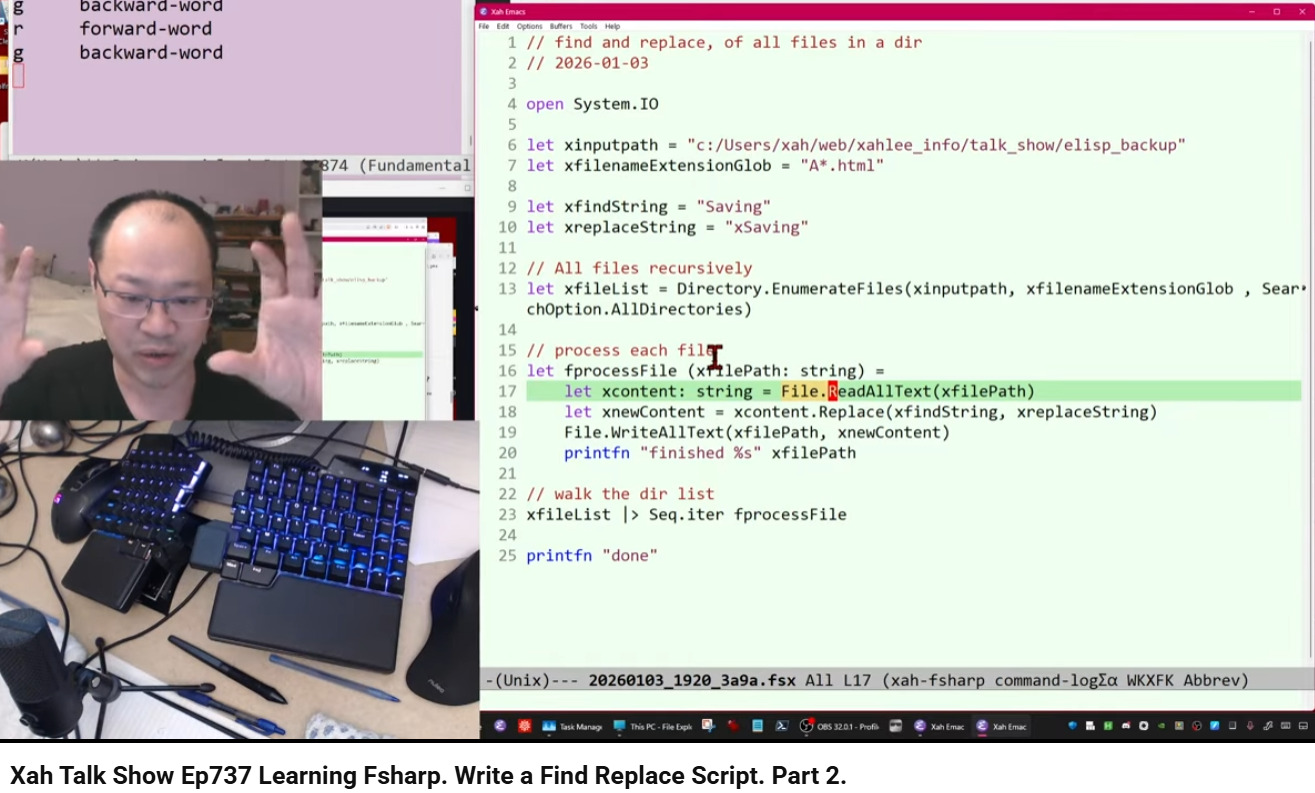
// find and replace, of all files in a dir
// 2026-01-03

open System.IO

let xinputpath = "c:/Users/xah/web/xahlee_info/talk_show/elisp_backup"
let xfilenameExtensionGlob = "A*.html"

let xfindString = "Saving"
let xreplaceString = "xSaving"

// All files recursively
let xfileList = Directory.EnumerateFiles(xinputpath, xfilenameExtensionGlob , SearchOption.AllDirectories)

// process each file
let fprocessFile (xfilePath: string) =
    let xcontent: string = File.ReadAllText(xfilePath)
    let xnewContent = xcontent.Replace(xfindString, xreplaceString)
    File.WriteAllText(xfilePath, xnewContent)
    printfn "finished %s" xfilePath

// walk the dir list
xfileList |> Seq.iter fprocessFile

printfn "done"