MathCurvesSurfacesWallpaper GroupsGallerySoftwarePOV-Ray
ProgramingLinuxPerl PythonHTMLCSSJavaScriptPHPJavaEmacsUnicode ♥
Web Hosting by 1&1

Ergonomic Keyboards Gallery

Xah Lee, , …,

This page is a gallery of ergonomic keyboards.

Microsoft Ergonomic Keyboard 4000

Microsoft Natural Ergonomic Keyboard 4000
“Microsoft Natural Ergonomic Keyboard 4000”. amazon

This is a much more improved design. This one i used for 3 years, from 2007 to 2010. The stiff Space bar finally drove me crazy. Full review at Microsoft Natural Ergonomic Keyboard 4000.

TypeMatrix

typematrix keyboard
“TypeMatrix keyboard” amazon

This is another interesting design. It's better than laptop-style keyboards for sure, such as Apple's Aluminum Slab, but worse than real ergonomic keyboards. For one thing, it has shallow flat keys, not good for serious typing. Full review: TypeMatrix Keyboard Review.

“Truly Ergonomic” Keyboard

Truly Ergonomic Computer Keyboard-207 nopalmrest front left
“Truly Ergonomic keyboard”

Excellent! Full analysis at the Truly Ergonomic keyboard.

Kinesis Contoured Keyboard

Kinesis Contoured keyboard
“Kinesis contoured keyboard”. Source amazon

Full review at Kinesis Contoured Keyboard Review and RSI

Maltron keyboard

Maltron flat keyboard
The flat version “Maltron 2d flat keyboard”.

Maltron keyboard comes in many different models. It has bowl-shaped version like the Kinesis, and also flat version. Full review at: Maltron Keyboard Review.

μTRON Keyboard

utron keyboard 02
“μTRON Keyboard”

This is a excellent keyboard from Japan. See: μTRON Keyboard.

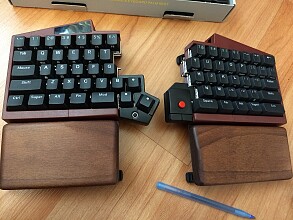
Datadesk Tech Smartboard Keyboard

This one is one of the best.

smartboard keyboard
“Datadesk Smartboard” Source www.datadesktech.com
smartboard keyboard keys
This indicates that the key switch is a mechanical switch, not cheap rubber dome. Source geekhack.org
smartboard keyboard 2
Source www.atpm.com

I think the design is:

The questions is whether this keyboard is well-built, and whether the company is reliable. See one review here: 〔SmartBoard USB5000 Review By Christopher Turner. @ www.atpm.com…〕. According to reviewers at Amazon, the company Datadesk Tech seems to be around as early as 1990s, and the company seems to be one-man running in basement. Not sure if it is still available.

Xah's Recommendations

I think the “Microsoft natural 4000” (≈$30) , or “Truly Ergonomic” (≈$220), or the “Kinesis Contoured” (≈$280) are all really great.

Taking their price into consideration, the Microsoft 4000 is the most easy buy. It is a mass produced product and made to appeal to the mass population. Quite superb design by its various curves and tilts. However, because it's made for mass appeal, it does not use expensive mechanical key-switch that provides good tactile feedback. It uses cheap key label technology, so the key labels wear off (On my keyboard, the labels M and < are COMPLETELY gone. (because fingernails often hit them)).

The key mechanism is Very Bad (in comparison to other Cherry MX as used in Kinesis, “Truly Ergonomic”, and many others keyboards that sell above $80). The Space bar is stiff (one of its most common complaints). It's somewhat loud, makes ugly “clunk”, “thud”, “squeak” sounds.

The “Truly Ergonomic” has best design that is simple and elegant. It is also with highest quality build.

The Kinesis Contoured is also great, but on the most expensive side, with radical design that doesn't make the keyboard good for sometimes casual peck of a few keys.

Size Comparison

Note that sizes from photos can be deceiving. The Kinesis looks huge, but is actually ≈5cm less wide than the Microsoft 4000, and the TrulyErgonomic is even smaller. (the TrulyErgonomic and Kinesis both have Num Lock key that turns the right hand side keys into a number pad. Similarly for the Kinesis)

kinesis microsoft keyboard sizes
Size comparison. Microsoft Natural vs Kinesis.
Truly Ergonomic Keyboard size comparison
Size comparison. Truly Ergonomic vs Microsoft 4000.

Exotic Ergonomic Keyboards

For many more, see: Exotic Ergonomic Keyboards.

blog comments powered by Disqus