Discovered quite a few excellent input devices. Here's a quick list and comment.
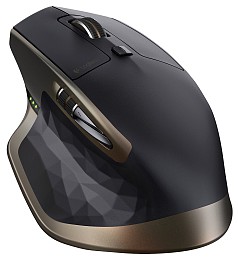
The Cyborg is probably the best mouse, regardless whether you use it for gaming or not. It's got 7 customizable buttons; standard scroll wheel, but plus a thumb scroll wheel! Says some incredible DPI but i never care about the DPI much as long as it is decent. 〔☛ Does Mouse DPI Matter in Gaming?〕
I do, even for normal work that's not a game.
I'm a functional guy. What i like most about this mouse is 7 programmable buttons and 2 scroll wheels. My current mouses both have 5 buttons. (i use 2 mouses at all times, one for each hand, whichever comes handy. Been using 2 mouses since ≈1994.) Both of my current mouses have 5 buttons. But that's not enough!
Suppose you are in a web browser. The left is click, and right is contextual menu. The middle button can close a tab (middle click on tab), or it can open a link in a new tab. This is more convenient than using one hand to hold Ctrl and the other hand to click. The 4th and 5th button are for page back/forward.
So there, all used up. What more do i want? I want 2 more buttons to switch to next/prev tab. Another to close current tab (so i don't have to AIM at a tab), to begin with.
(you might think you don't need the right button and can set it to something else. Actually you do, few times a day. ⁖ to copy the link url, to right click on toolbar, or in Firefox to use some of the extensions. No, the right-click functionality cannot be done with Control+Click, nor by the ▤ Menu key. (you might think that the ▤ Menu key is functionally equivalent to right-click, but actually it's not. Try this: move mouse so cursor is on a image. Now, right-click gives you a menu with {Copy Image, Save Image As}. Press ▤ Menu doesn't give you that.))
As of , according to amazon reviews, this mouse may not be so good. (read those 1 star or 2 star reviews) It's perfect in hardware, but software is bad. • It has tracking issues. • The bundled software sucks. • Not comfortable for small hands, and hard to lift. • It does not work in Mac OS X.
For more mouse reviews, see:
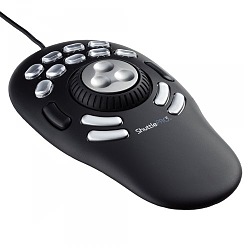
See: Why You Need a Jog-Wheel?.
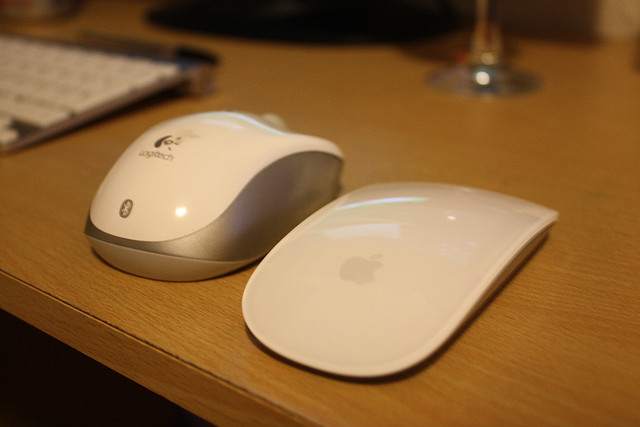
Apple Magic Mouse. The entire surface is smooth. No buttons. No scroll wheel. It works by touch sensitivity, like a touch pad. And you can use “gestures”. For example, to left click, tab on the left side with one finger. To scroll, move your finger on the surface up or down. To zoom, touch the surface with two fingers and widen your fingers.
Is this good mouse? No. If you want to impress your friends, yeah. If you want it for industrial use, ⁖ heavy gaming, long hours in image-editing or editing in 3D Modeling Software, it would suck badly.
The Magic Trackpad is just a large trackpad. That's all. I wouldn't say a trackpad is good replacement for a good mouse in general.
Every few years, Apple comes out with shiny and novel toys. Actually i don't recommend them. If you are a casual computer user, yeah Apple's input devices look great and work well. If you are in any way using the computer professionally, such as serious gaming, PhotoShop or visual artist, creating 3D Models, or programing (heavy Emacs or keyboard Macros use), Apple's creative input devices are usually less efficient and less ergonomic than the humble homely standard ones.
See also: Apple Keyboard Reviews.
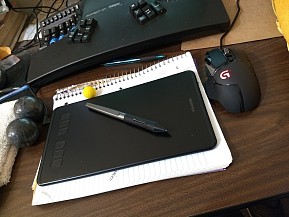
Now, if you do a lot image editing or drawing, you need a pen tablet, absolutely. This is something i can recommend.
Just to be complete… the best keyboard, gaming or not, to me, are:
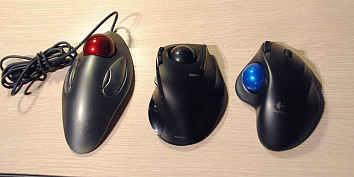
The best trackball, is probably the “CST's 5-button L-Trac trackball”. Reviews here: Best Trackball Mouse.
and i truely recommend the Logitech G13 Advanced Gameboard, if you are a gamer or programer, who must have extra buttons. And no, i don't want 【Ctrl+Meta+⇧ Shift+Alt+@】. I want single goddamn key. I rather have 30 extra keys than 5 more modifier keys. All seriously, for example, i have setup AutoHotkey so that i press a single key for 【Alt+Ctrl+Tab ↹】 or 【Alt+Ctrl+⇧ Shift+Tab ↹】 or【❖ Win+Ctrl+⇧ Shift+Tab ↹】 or 【Alt+Tab ↹】 or 【Alt+⇧ Shift+Tab ↹】. And i have single key for 【Ctrl+⇞ Page △】 and 【Ctrl+⇟ Page ▽】. And no, i don't want Apple's reductionism rectangular array beautiful shit. I want my buttons to be different shapes, in separate clusters, and curved. A airplane cockpit is a good example that illustrates practical functionality and efficiency. Just imagine, if Apple designs a cockpit, all the controls and knobs become one neat rectangular array of identical buttons. (see: Keyboard Shortcut Design: Dedicated keys, Special Buttons, Extra Keys.)
Many gaming and 3D modeling software can use a specially designed input device. ⁖ Second Life, Google Earth Mouse Navigation and Keys, Flight Simulator, and other 3D Modeling Software.
See Review of SpaceNavigator & Mathematical Models of 3D Inputs Control.
There, i covered it all. Buy them all!
For headsets and webcam, see: Gaming Headset Reviews.