Emacs Init Setup
emacs init: Ruler Mode
By Xah Lee. Date:
2023-09-06
. Last updated:
2025-08-17
.
Alt
+
x
ruler-mode
Display a ruler at top of current window.
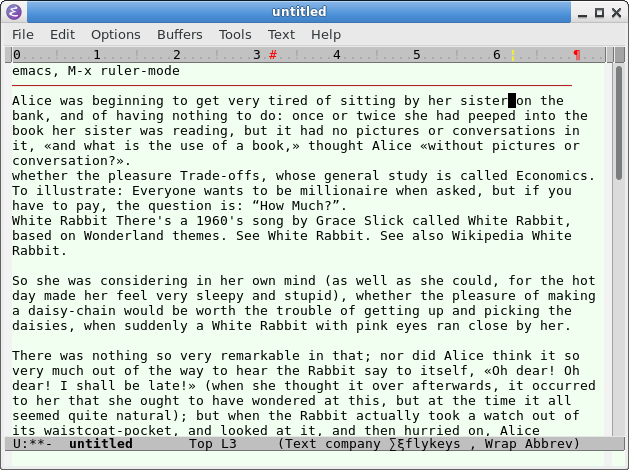
emacs30 ruler mode 2025-08-17
Emacs Lines, Column, Cursor Position
Soft-Wrap Lines
Emacs: Visual Line Mode
Emacs: Toggle Word Wrap
Emacs: Line Wrap
Emacs: Novel Reading Mode 📜
Emacs: Toggle Line Spacing Command 📜
Emacs: toggle margin 📜
Reformat Lines
Emacs: Hard-Wrap Lines (fill-region)
Emacs: Reformat to Long Lines (unfill-region) 📜
Emacs: Reformat Lines for Source Code 📜
Show Line Number, Column Number
emacs init: Show Line Numbers
emacs init: Show Cursor Column Position
emacs init: Ruler Mode
Highlight Current Line, Screen Line
emacs init: Highlight Current Line
emacs init: arrow keys move by visual line, logical line
Emacs Search 🔍
Emacs Init
Init Basics
Emacs init file
Sample Init File
Command Line Options
Important
Font Setup
Window Size
Keys
Which Key Mode
Text Editing
Type Overwrite Selection
Tab, Indent
Auto close bracket
Isearch Whitespace
Move Cursor by camelCase
Completion
Icomplete
Hippie Expand
Abbrev Mode
File
Set Default File Encoding
Auto Refresh File
Default Major Mode
Dired Init
Restore Things
Restore Opened Files
Save Cursor Position
Save Command History
Backup, Auto Save
Real Auto Save
#auto-save#
Auto Backup~
Line Editing
Hard-Wrap Lines
Visual Line Mode
Arrow Key Move by Logical Line
Line Appearance
Highlight Current Line
Show Line Numbers
Show Column Position
Show Ruler
Toggle Word Wrap
No Wrap Lines
Line Spacing
Appearance
Highlight Brackets
Set Color Theme
text-quoting-style
Whitespace Mode
Show lambda as λ
Misc
Bookmark Init
Misc Init Tips
Command Alias
Minibuffer Prompt
Advanced Init Tips
Major Mode
Minor Mode
Show Variable Value
M-x customize
Organize Init File
Byte Compile
Hook
Environment Variable
Get System Info
packages
Install Packages
Install Package Manually