Linux: xfce keyboard shortcuts
The following are the default Xfce keys. (latest public Xfce version as of )
The config file is at
~/.config/xfce4/xfconf/xfce-perchannel-xml/xfce4-keyboard-shortcuts.xml
Window Manipulation Keys
- Alt+Space
- Window operations menu
- Esc
- Dismiss/cancel dialog
- Alt+Tab
- Switch to next window. With Shift for previous.
- Super+Tab
- Next window of current app.
- Alt+F4
- Close window
- Alt+F7
- Move window
- Alt+F8
- Resize window
- Alt+F9
- Hide window
- Alt+F10
- Maximize window
- Alt+Shift+PageUp Alt+Shift+PageDown
- Raise/lower window
- Alt+F11
- Toggle fullscreen
- Alt+F12
- Toggle above
- Ctrl+Alt+d
- Show desktop
Move Window to Workspace (virtual screen)
- Alt+F6
- Stick window (show in all workspace)
- Ctrl+Alt+End
- Move window to next workspace
- Ctrl+Alt+Home
- Move window to previous workspace
- Ctrl+Alt+numpad 1
- Move window to workspace 1
- Ctrl+Alt+numpad 2
- Move window to workspace 2
Switching Workspace
- Ctrl+Alt+→ Ctrl+Alt+←
- Next/Previous workspace
- Ctrl+Alt+↑
- Upper workspace
- Ctrl+Alt+↓
- Bottom workspace
- Ctrl+Alt+←
- Left workspace
- Ctrl+Alt+→
- Right workspace
- Ctrl+F1
- Goto workspace 1
- Ctrl+F2
- Goto workspace 2
- Alt+Insert
- Add a workspace
- Alt+Delete ⌦
- Delete last workspace
- Ctrl+Alt+Delete ⌦
- Lock the screen
Misc
- Super+p XF86Display
-
xfce4-display-settings --minimal - Ctrl+Esc
-
Show Context Menu.
xfdesktop --menu - Ctrl+Alt+Delete ⌦
-
Lock screen.
xflock4 - Alt+F2
-
Start prompt to run command.
xfrun4
How to Change Keys
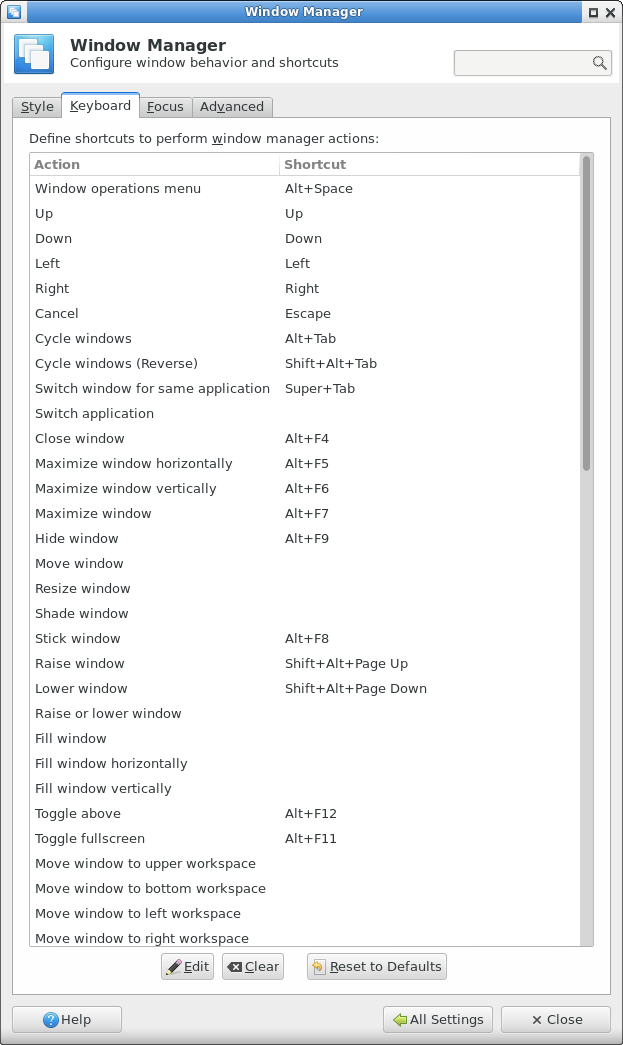
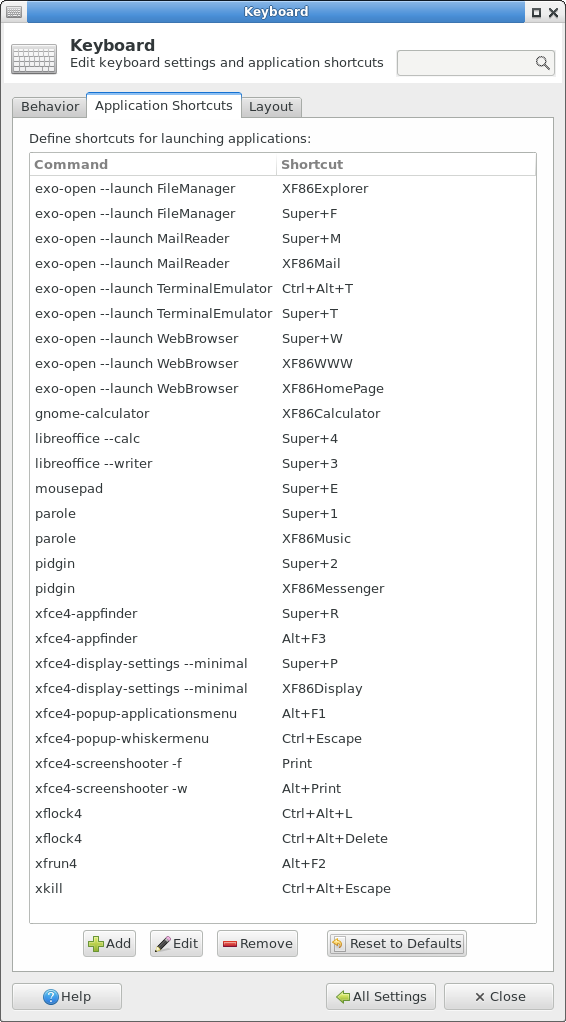
You can change the keys in Settings control panel. Launch it by xfce4-settings-manager.
- Window Manager panel
- Keys related to general manipulation of windows and virtual screen.
- Keyboard panel
- Keys related to launching app, etc.
Mouse Wheel
- Hover your mouse over the taskbar, then scroll mouse wheel to cycle windows.
- Hover your mouse over empty space on desktop, then scroll mouse wheel to cycle workspaces.
You can set mouse so that hover will activate the window (put focus on it and bring it to front). Set in the Window Manager preference pane.
Tip: One Workspace
To make it simpler, set workspace to just 1, and turn off all keys about workspace. And just define a few, single-key, function keys, to close window or switch to your most frequently used app. Example:
- F5
- Switch to last window
- F6
- Cycle window
- F7
- Cycle window within a app
- F8
- Close window
- F9
- Switch to Firefox
- F10
- Switch to emacs
- F11
- Switch to terminal
For how to switch to a app, see: How to Set Key to Switch to Browser (2012) .