Logitech Gaming Keyboards
This page reviews Logitech's gaming keyboards, written by and for programers.
If you use gaming keyboard for playing games, great, but if you are a programer, the key macros feature would be fantastic. Use it to switch {window, apps, workspace}, jump to {editor, IDE, browser, terminal}, switch tabs, close tab, close window, switch views, etc.
Logitech Gaming Keyboards 2018-09
- G213. RGB Gaming Keyboard $69.99 Buy at amazon
- G413. Mechanical Backlit Gaming Keyboard $89.99
- G512. Carbon, RGB Mechanical Gaming Keyboard $99.99
- G513. RGB Mechanical Gaming Keyboard $149.99
- G610. Backlit Mechanical Gaming Keyboard $119.99
- G613. Wireless Mechanical Gaming Keyboard $149.99
- G910. RGB Mechanical Gaming Keyboard $179.99
- Pro. Designed for Esports Professionals. $129.99
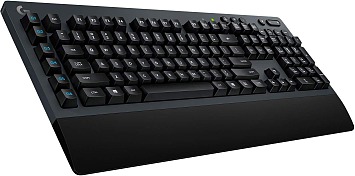 Logitech G613 Keyboard. 2017
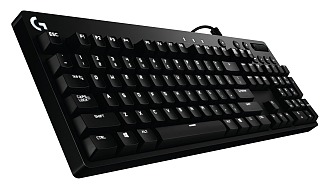 Logitech G610 Orion Brown Keyboard, 2016
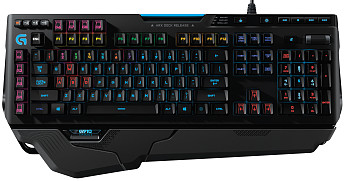 Logitech G910
Logitech G910 is best, except the teen gamer look, and expensive. Romer-G Switch is quiet, has on-board memory, and programable keys.
When is a Keyboard “Gaming” Keyboard?
In my research, i haven't came across any so-called gaming keyboard that are ergonomic. For example, curved or split into 2 sections. There are fringe gaming keyboards that are split, but isn't really ergonomic at all. This brings up the question: “How do you define the term ‘gaming keyboard’”? Basically, a keyboard designed more or less for playing games. The problem is, some keyboards not branded “gaming” are in fact much better for gaming than dedicated “gaming keyboards”.
The most important element of gaming keyboard in terms of functionality is re-programable keys. Secondarily, with many extra keys, buttons, knobs, and in some cases a LCD display. Many keyboard are actually better for gaming than the so-called gaming keyboards. All you really want is a ergonomic shaped one, with mechanical keys, full function buttons. Or, use the numpad as function keys. [see Using Numeric Keypad as Function Keys] If you don't have the numpad, then get Logitech G13 Gameboard.
Advantage of Gaming Keyboard
Gaming keyboard are the vanguard of keyboards. They include these features:
• 5 to 18 extra function keys. (Real keys, not some wimpy rubbery buttons.)
• Almost always, the standard function keys {F1, …, F12} are real keys, and arranged in groups of 3 blocks. (this makes them easy to hit correctly without looking.)
• Un-altered and complete set of modifier keys (e.g. Ctrl, Alt, 🪟 Windows, ▤ Menu), on both sides. (as opposed to omitting some of them or replacing them with the hardwired Fn key or Flip3D key) [see Keyboard Modifier Keys, Short Survey]
• Gaming keyboard come with the most robust and easy-to-use key macro software. You don't have to spend days to learn about key map tools such as AutoHotkey or Linux bunch of tools. [see Linux: Keyboard Software Guide]
• High-end gaming keyboards USUALLY have on-board memory. This means, you can plug-in your keyboard to any computer, on {Microsoft Windows, Mac OS X, Linux}, and all your key settings work. (Some gaming keyboard use internet-based (aka “cloud”) config, which is very bad. It means you always need internet connection for your macro keys to work, and or need to install a software on each and every computer you use the keyboard. Examples are Corsair Gaming STRAFE RGB Keyboard, as of 2016-08-28. [see Corsair Keyboards] and Razer Orbweaver Keypad. )
Why do you need all those function keys? Just take a look at these:
In Photoshop, in emacs, in IDE, and even in browser, you also have some 30 key shortcuts involving Ctrl or other.
Discontinued
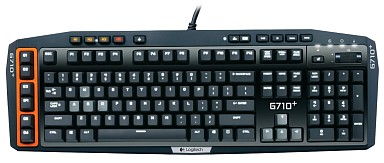 Logitech G710+
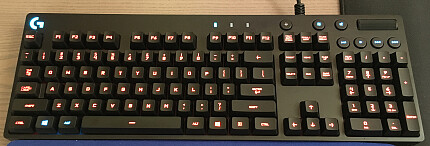 Logitech G810 Orion Spectrum
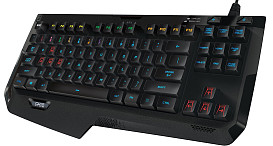 Logitech G410 (2015)
 Logitech G510 (2013)
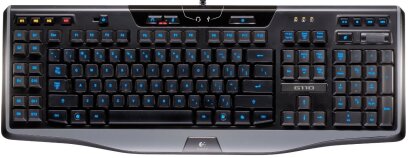 Logitech G110 (2009)
- Logitech G15 Buy at amazon