Emacs: Search Text
Interactive Search
isearch-forward【Ctrl+s】-
Interactive search text in current buffer.
While in isearch prompt:
- Ctrl+s → Jump to next occurrence
- Ctrl+r → Jump to previous occurrence.
- Ctrl+g → Exit and place cursor at original position.
- Enter → Exit and place cursor at current position.
- Ctrl+y → paste to the prompt.

Smart Case Sensitivity
in isearch, if the search text:
- has uppercase letter, then it is Case-Sensitive.
- else, Case-Insensitive.
Toggle Case Sensitivity
Alt+x toggle-case-fold-search
- When enabled, it is smart case. (the default.)
- When disabled, it is Case-Sensitive.
Remember to toggle it back.
Smart Character Equivalence
emacs has many settings that control character equivalence for isearch, such as whitespace equivalence, unicode chars equivalence e.g. e é, 1 ①.
Search Word in Computer Language Source Code (Symbol with Boundary Check)
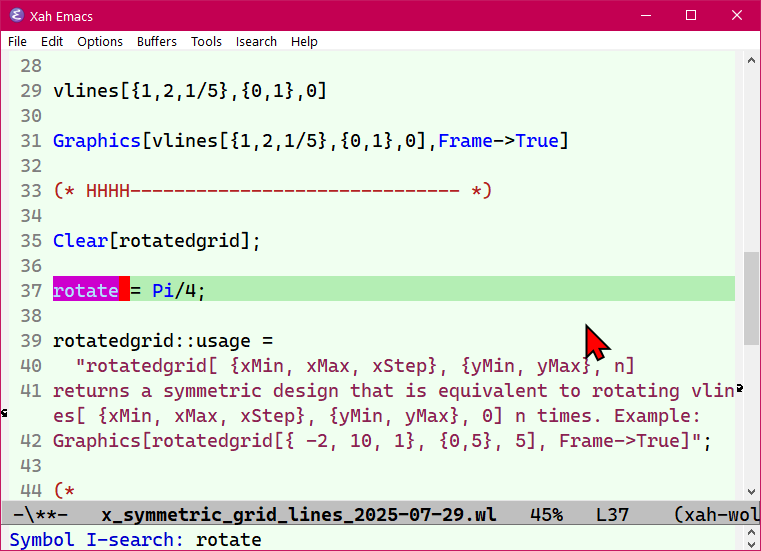
Search Current Symbol
isearch-forward-symbol-at-point【Alt+s .】-
- Search the symbol under cursor, with boundary check.
- Boundary check means, if current symbol is “xy”, it will not find “xy2”.
- Emacs: What is Syntax Word vs Symbol
emacs isearch symbol 2025-08-09 29c92
Search Symbol
isearch-forward-symbol【Alt+s _】-
search for a symbol with boundary check.
Interactive Search Sequence of Words
isearch-forward-word【Alt+s w】-
like isearch, but space is considered equivalent to newline, hyphen, lowline, comma, or other punctuations.
If you have isearch config set to whitespace equivalence, then this command is not very useful.
Interactive Search by Regex Pattern
Ctrl+u Ctrl+s
(this calls isearch-forward in regex mode.)
Non-Interactive Search (No Smart Features)
these are useful if you want to search text verbatim, ignore all smart equivalence of chars.
- Alt+x
search-forward -
search text after cursor position.
- Alt+x
re-search-forward -
search text after cursor position, using Emacs: Regular Expression Syntax
Reference
Emacs Find Replace
- Emacs: Search Text
- Emacs: Find Replace
- Emacs: Find Replace, by Regex
- Emacs: Find replace regexp output to diff
- Emacs: Find Replace and Change Letter Case
- Emacs: Highlight Word, Line
- Emacs: List Matching Lines
- Emacs: Search Text in Directory
- Emacs: Find Replace Text in Directory
- Emacs: Regular Expression
- emacs init: isearch Whitespace Regex
- emacs init: isearch by Arrow Keys
- Emacs Flaw: isearch Current Word
- Emacs: Search Current Word 📜
- Emacs: Xah Find Replace (xah-find.el) 📦